“Yeti”

That’s the nickname that Jay Reading goes by. Who’s Jay Reading? Before last week I had no idea.

I registered for a PDGA tournament here in San Antonio: the Battle All Up In the Briars tournament at McClain Disc Golf Course. I sent a link to my son Dan, who is the one who got me into the sport a few years ago. He read through the listing, and noticed who was organizing the tournament. He responded with “Jay Reading is the man – super cool”, accompanied by a picture of a signed Yeti disc. Apparently Dan had gone to a disc golf expo in Boston and met him there.

I had no clue who this guy was. I don’t really follow the professional circuit, and certainly didn’t in the late ’00s when he was one of the best playing professionally. But I thought it was pretty cool that Dan knew who he was.

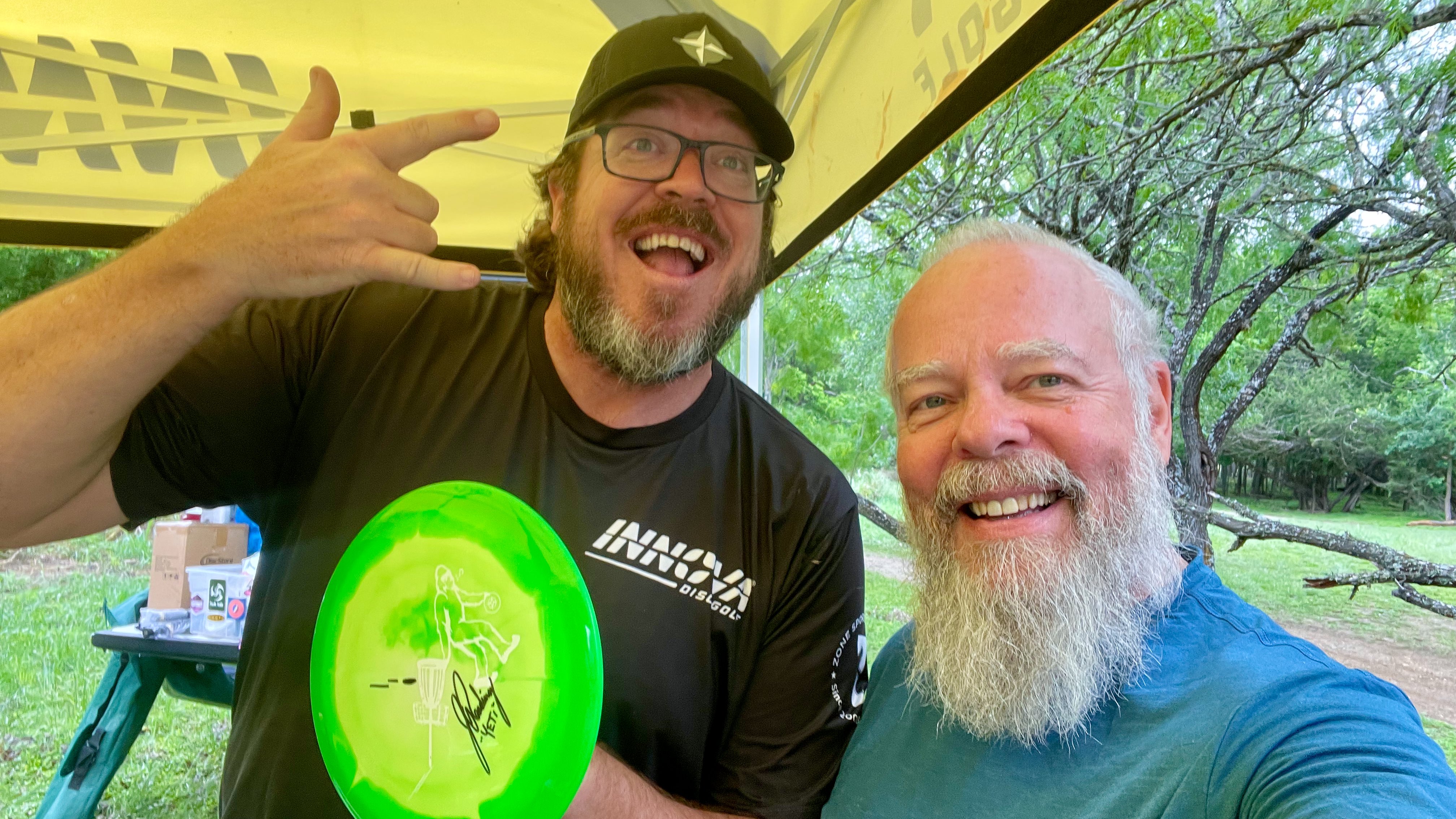
On the morning of the tournament, I met Jay and introduced myself. I told him my son was a big fan, and showed him the photo of the signed disc he had. I asked if I bought a disc, would he sign it and take a selfie with it and me?

Now if you’ve ever been to any kind of tournament, it’s a lot of work for the organizers, and disc golf tournaments are no different. But Jay didn’t hesitate – he agreed immediately, with this result:

Ed posing with Jay Reading, a professional disc golfer, and a disc signed by Jay.
Selfie with Jay Reading and signed disc

And it wasn’t just me – he seemed to connect with everyone there, even though there was a ton of other stuff going on.

They held a raffle to raise money for community disc golf programs, and one of the prizes was a hat from the Lazy Frog, a game store in Martha’s Vineyard where Dan lives that also carries a good selection of discs and other disc golf stuff. I texted Dan about that, and he told me that he had gone to the disc golf expo in Boston with the owner of the Lazy Frog!

Before I retired I got some NVIDIA swag for my kids, and Dan said to mention that he happened to be wearing the NVIDIA hoodie when he was talking to Jay. So I asked Jay if he remembered talking with anyone in an NVIDIA hoodie, and after a moment he said he did! He had bought some NVIDIA stock at some point, and thought that Dan worked there! It was crazy to have this connection almost 2,000 miles apart.

So now I’m also a Jay Reading fan: not for his disc golf abilities (although they are impressive – I watched some YouTube videos), but because he is a genuine person who seems to really care about what he does.

Disc Golf Tournament Play

Yesterday I played in my second-ever PDGA tournament. Let’s get the obvious out of the way: I didn’t play that well. But it wasn’t about winning, although I did try my best on every shot. It was about keeping myself challenged: I want the motivation to work on my throws so that I don’t embarrass myself any worse than I did in my first tournament, back in January. I thought I was pretty good but not great, but I learned the truth: I was terrible, compared to people my age who had been playing for longer. The most obvious shortcoming was my distance off the tee: I routinely needed 2 or sometimes even 3 shots to reach the others’ first shot.

One thing to note, though: when I used to play regular golf (you know, the kind that uses little balls) and there was a player in a foursome who was not as good as the others, more often than not I heard others berate the player for slowing them down. Not here, though: my group was supportive and encouraging, and never made me feel unwelcome. Amateur disc golfers seem to be much friendlier than amateur ball golfers.

After the tournament I decided to get serious. I started to record my throws on video, where I could review it afterwards. That was especially enlightening! When I threw, I tried to consciously control my arm’s position and angle so that I was moving it in a straight line forward, while also keeping my weight centered. The video showed the exact opposite: I was taking the disc from very low, and instead of just reaching back, I was raising it almost a foot above my shoulders. All that up and down motion both robs you of distance and makes consistency impossible. I was also doing a lot of back-and-forth swaying with my weight.

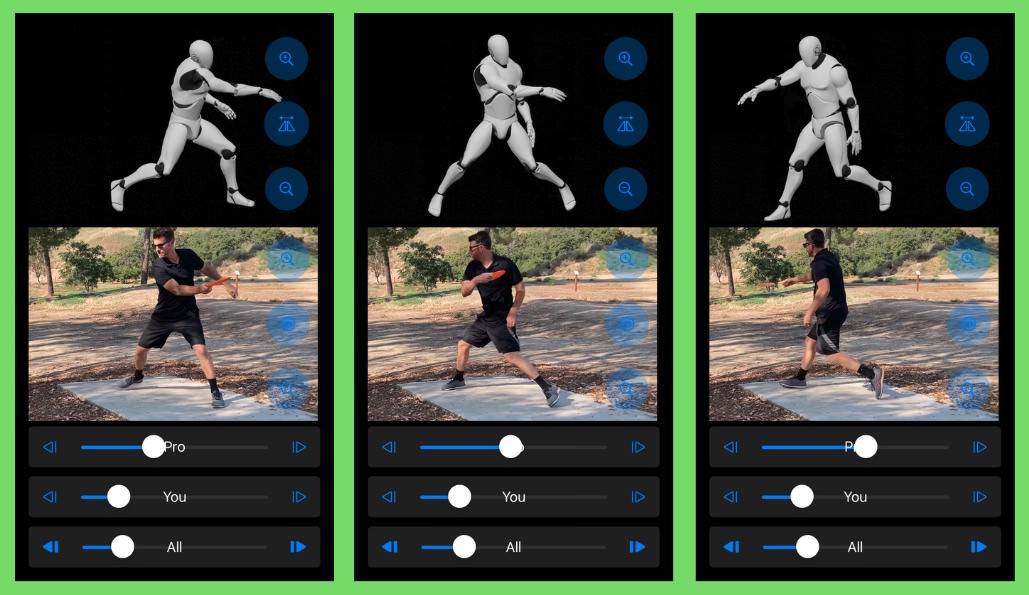
I bought a practice net, so I could work on my technique throughout the day, instead of having to set aside a couple of hours to drive to a park to practice. I got rid of my walk-up and switched to a standstill throwing technique to reduce variables. I watched videos so I could compare my throw to others. But what really helped was discovering this app: Snapdisc. This records your throws on video, but also lets you compare your form when throwing to a model set to correct form.

Demo of the Snapdisc app comparing throwing form against an ideal model
Snapdisc Demo

What’s even more impressive is that the app is free! So I would record some throws, reviewing after each to see if what I felt matched what the camera saw. Slowly I began to get better feel for what I was doing. And when I did go out to a field to throw, I was getting longer. Before I would typically throw 150 feet, with an occasional 175. Now I’m averaging 180 feet with the occasional 240-250.

Yesterday’s results were not all that impressive, until you compare to how I did in January. In that first tournament, I shot +65 over par over the 36 holes; yesterday I was +48. That alone was a big improvement, but they also were very different courses: yesterday’s course had a LOT of trees, and I’m sure I hit most of them πŸ˜†. I lost at least a dozen in each round to that.

The other thing that was great about the tournament was the guy who ran it: Jay Reading. I’ll write about that in a follow-up post.

A Decade Together

Ten years ago today, Linda and I formalized what we had already known for some time: that we were so much better together, and wanted to always keep it that way. It was so obvious that there was never a marriage proposal by either of us; we knew that it was what we both wanted.

Looking back, it seems that we were so young, even though we were in our late 50s:

Linda and Ed posing just after being married.
Just after being married, January 16, 2016

We may be older now, but we’re still going strong! Here’s to the next 10 years!

Ed and Linda pose for a selfie in downtown Fortaleza, Brazil, in October 2025
Ed and Linda in Fortaleza, Brazil, October 2025

Working With AI

It’s been impossible to not have been bombarded with all the hype about AI ever since ChatGPT. There are now several powerful LLM tools available, and one of the claims is that they can write software better than human programmers. As a software developer myself, and one who’s been doing this kind of thing for longer than many of my colleagues have been alive, you might understand my skepticism.

Before I retired, NVIDIA gave all of its employees access to Perplexity Pro, so that’s the LLM I have the most experience with, but I have tried several others. At first I would ask it to write some Python code to replicate a problem I had already solved, to get a feel for how well it did. Most of the time the solution it provided worked, but just didn’t feel “elegant” – it was much more like a beginner would create. But it did work in most cases.

You may have heard the term “vibe coding” used to describe a non-developer using AI to write code. I have tried that, and the results were spotty at best. I decided to write an app for my iPhone that would be useful when practicing disc golf by measuring the distance of a throw. I had no experience with writing Swift or developing with SwiftUI, so it was about as close to vibe coding as I could imagine.

The process was surprisingly quick: it gave me the basics I would need to set up the app, get the mapping tools working, and implementing buttons. It wasn’t smooth sailing, though, as Perplexity would suggest code that was for different versions of Swift, and they would throw errors. I could then copy those errors and paste them back into the “conversation” with Perplexity, and it would respond with a correction (usually preceded by an apology – nice touch!). I did get something working in a couple of days, so I would say it was a success. Adding additional features, such as voice interaction, proved to be a much tougher endeavor; there were just too many incompatibilities that were hit as it tried to write the more complex interactions.

So based on my meager experimental sample of 1, I would say that vibe coding works, but only for the simplest of cases. It felt like asking a machine to design a house: sure, it could probably come up with something boxy that would work, but once you tried to add some style, it would probably mix things up. It’s a language processor, after all, and doesn’t actually understand anything.

Where I’ve found AI to be helpful is when I need to write some code in a language or environment that I don’t work in often, or solve a strange bug. Let me give you an example from yesterday.

I’ve hosted technical email lists on my servers for over 25 years, and I maintain an archive of every message. It’s all automated and generally works well. Each month it analyzes the previous month’s traffic, and posts a summary.

The June summary for the ProFox list came out on July 1, and it was missing most of the messages for that month. I investigated, and found a problem with the archive software that was pretty straightforward to correct. The problem was that I no longer had the original messages to add back to the archive. Some subscribers did, so I was able to add them back – except for one.

The error was clear enough: the text had a smiley emoji, and the MariaDB database column that holds the text of the message was defined with utf8 encoding. Emojis require multibyte (utf8mb4) encoding, so I ran the ALTER TABLE command to change the encoding. This took almost an hour, as the table has over a half-million records that needed to be re-encoded, but when it completed, I confidently re-ran the command to add the message, but once again it failed – with the exact same error! So I turned to Perplexity, fed it the table structure and the error, and it quickly came back with a solution: not only did the column need to be utf8mb4, the entire table has to be defined with that encoding. So once again I ran ALTER TABLE, but it took over 2 hours this time.

When it finally finished, I re-ran the command, and once again it failed, with the exact same message! I read Perplexity’s answer once again, and noticed that I had missed one part of it: defining the connection in pymysql. I needed to also tell the connection to use the correct charset:

    conn = pymysql.connect(
        host=HOST,
        user=creds["DB_USERNAME"],
        passwd=creds["DB_PWD"],
        db=db,
        cursorclass=cls,
        charset="utf8mb4",     <========
        use_unicode=True,      <========
    )Code language: PHP (php)

I had never added those parameters before, as they were never needed – it worked fine with the defaults. But once I added them, the command to add the message worked flawlessly! So in this case, Perplexity saved the day. I’m sure I would have figured it out eventually, but this was so much faster, as Perplexity runs multiple searches on the web and analyzes the responses in order to come up with its answer to your question.

And that’s what machines will always be better at than humans: doing multiple things at once. I could have run those searches, but going through the results to see which matched what I needed would have taken a whole lot longer than what Perplexity could do. That’s the sweet spot for coding with AI: not having it design your application or its interface, but solving those edge case bugs that would take you a much longer time to figure out.

Letting Go

In my early 20s I got interested in working with my hands building things. I read everything I could find (remember, this is long before YouTube existed; you had to get actual books!) This led to a career of renovating houses that lasted over a decade.

When I first got some tools I wanted to start on something, but like a blank screen staring back at you when you try to write, the problem was where to start. Then one day I was driving along and saw an old, beat-up desk by the curb. It just so happened that I needed a desk for working on my brand-new Apple IIc, so I managed to get it into the trunk of my Mercury Capri, which needed lots of rope to keep it from falling out.

When I got it home I began stripping it down to the wood, as well as fixing some loose parts. I sanded it smooth, gave it a couple of coats of polyurethane, and fitted it with new hardware. It looked great, if I do say so myself.

Over the years that little desk has been used one way or another in every house I lived inβ€”but not any more. There simply isn’t space for it in our new house. Not that the house is small, but it’s very old and the room shapes simply don’t leave room for it. So today when Goodwill Home Pickup came to clear out the furniture we couldn’t take with us, it was among the items they took.

My old desk being loaded into a truck
Goodbye, old friend!

I would say that 40 years of service after being tossed to the curb is quite impressive. It’s still in great shape, so I hope whoever gets it next can make use of it for many more years to come.